The request that comes after harvest.
It usually arrives as a phone call. “Can you get me my bushels by field? I want to see what each one made.” The tickets are all there, and each one names its field. But forty tickets in a folder is not an answer. Somebody still has to sort them by field, add up the bushels, and divide by the acres.
At a small elevator that somebody is you, in November, with a calculator.
What the report shows.
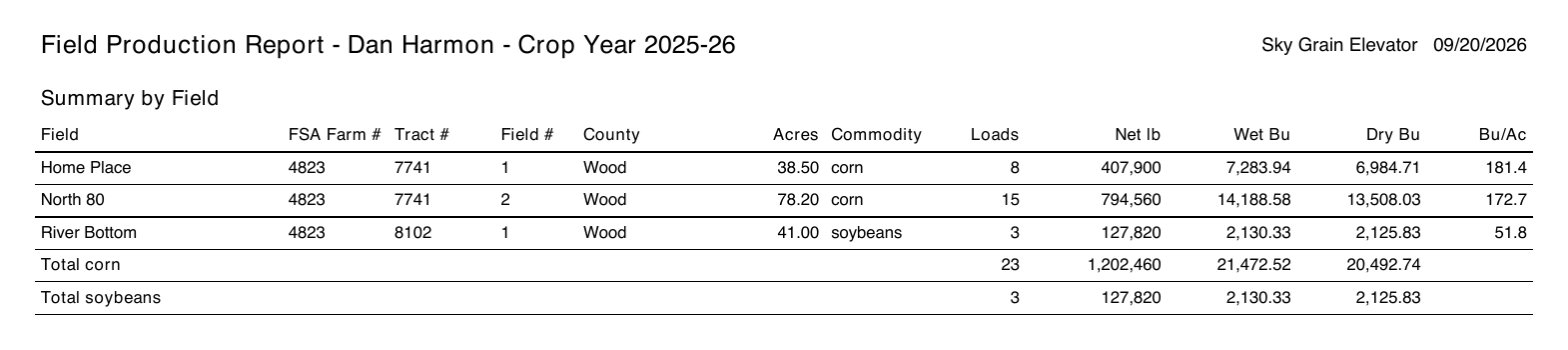
The field report is one PDF per customer and crop year. The first page is a summary: one line per field with its FSA farm, tract, and field numbers, county, tillable acres, loads, net pounds, wet and dry bushels, and bushels per acre. Totals by commodity sit underneath.
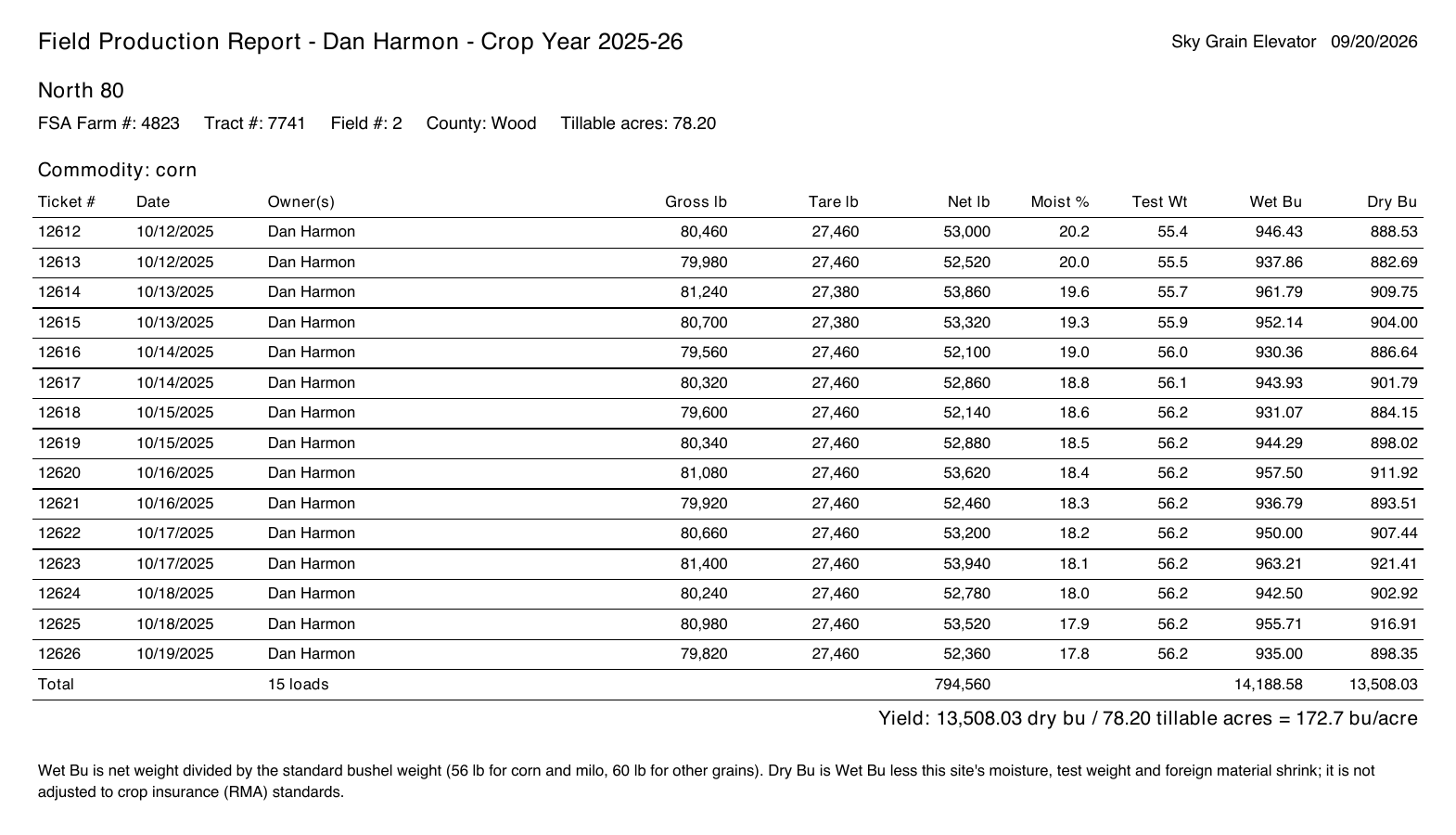
After the summary, every field gets its own page listing each load that came off it: ticket number, date, owner, gross, tare, net, moisture, test weight, wet bushels, dry bushels. At the bottom the yield is written out in full — dry bushels, divided by tillable acres, equals bushels per acre — so anyone reading it can check the math.
The details we were careful about.
- Only closed loads count. A ticket still open on the scale is not production yet.
- Split loads count in full. If a load is shared 60/40 with a landlord, the report lists both owners and counts the whole load. Yield belongs to the field, not to one owner’s share.
- Loads with no field are called out, not hidden. If six of his loads were never given a field, the summary page says so, with the bushels. Better to find that in November, while everyone still remembers which field it was.
- It survives the season-end cleanup. Pick a prior crop year and it is all still there.
- It says what it is. This is a summary of what crossed your scale, not a crop insurance form. Every field page notes that dry bushels reflect your site’s shrink schedule, not crop insurance (RMA) standards, and the yield line uses the tillable acres you have on file for the field, not the acres on the farmer’s FSA-578. The scale tickets are still the record. This is the page that adds them up.
The tickets answered “which field was this load from?” The report answers “what did this field make?”
One Reports button.
The Grain Summary, the printable rundown of a customer’s grain for the year, used to hide behind a small printer icon with no label, and a second report lived on a different page entirely.
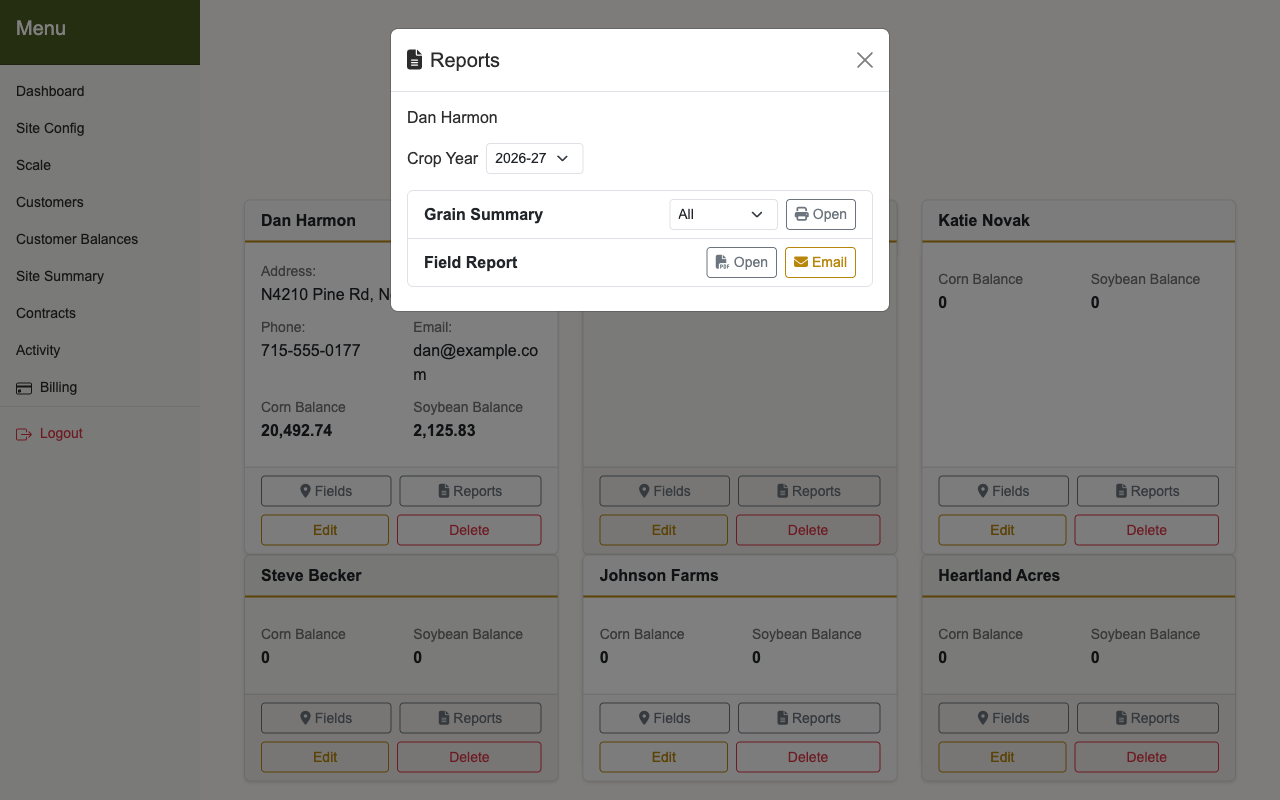
Now every customer card has a Reports button, on both the Customers page and Customer Balances. Press it, pick the crop year, and both reports are right there. The Grain Summary can finally reach prior years too; before, it only ever showed the current one.
How to use it: a quick walkthrough.
- Set up the customer’s fields, with tillable acres. No acres, no bushels per acre. See the farm fields post for the setup.
- Pick the field on each delivery as loads come in. This is the step that makes everything else work.
- Press Reports on the customer’s card and choose the crop year.
- Open the Field Report. It opens as a PDF to print or save.
- Or email it. On the web version, if the customer has an email on file, Email sends him the PDF directly. It asks you to confirm the address first.
There is nothing to turn on. If a customer has fields, he has a field report.
Why this matters at small elevators.
Every farmer wants to know what each field made. It shows which fields are pulling their weight, what a field is worth in rent, and what he tells his landlord. Usually he has to work it out himself from a shoebox of tickets. Now you can hand it to him in thirty seconds, with every bushel tied to a field and the math shown.
You were already weighing the loads. The record should not be a second job.